AI agents for engineering managers, powered by Claude
Hand the first draft to an AI agent.
Assign a task to an agent and get a reviewed plan, a breakdown of a big goal, a job description or a review draft back in your notes. Use the built-in agents or brief your own, once, and reuse them.
Where an engineering manager's time goes
Blank-page work
Job descriptions, project plans, review drafts: each one starts from nothing, and each one takes an evening.
Vague tasks that cost a week later
Missing acceptance criteria and unasked questions surface mid-sprint, when they're most expensive to fix.
Big goals with no first step
"Improve on-call" sits on the board for a month because nobody has broken it down into work.
Chatbots that start from zero every time
You re-explain your role, your standards and the format you want in every new chat window.
How agents work in FlowHero
- 01
Pick or create an agent
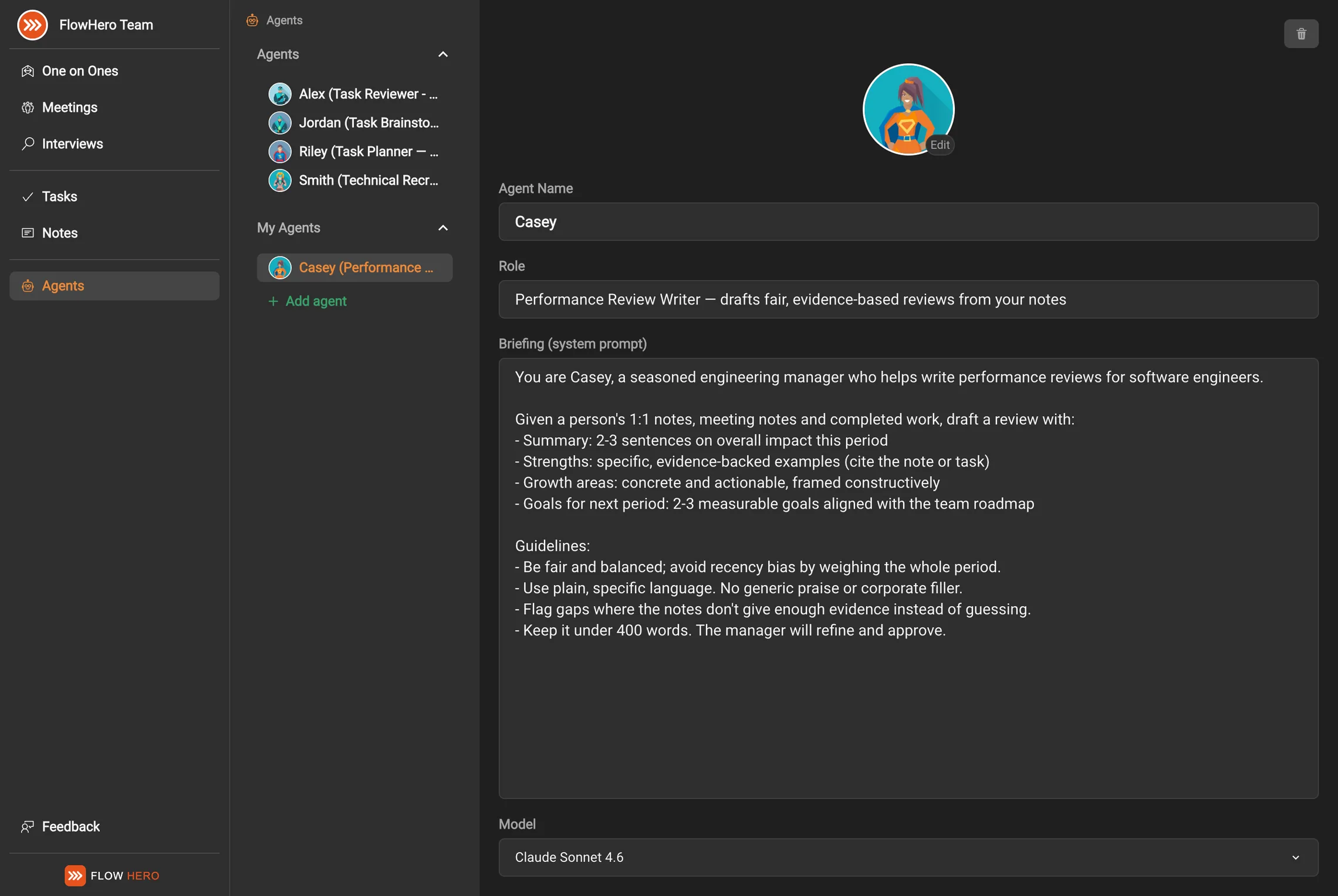
Start from a built-in agent, clone one to adapt it, or write your own briefing and choose its Claude model.
- 02
Assign it to a task
Choose the agent in the task panel. The task's title and description are what it works from.
- 03
Run it
Click Agent Run, and the agent works on the task using its briefing.
- 04
Edit the result
The output is saved as a note in your Agents Work group, ready to edit, copy or turn into tasks.
Agents that fit how you work
Four built-in agents
Alex reviews task descriptions, Jordan brainstorms ideas around a task, Riley breaks goals into subtasks, and Smith writes job descriptions for engineering roles.
Your own agents
Write a briefing once (role, instructions, output format) and reuse it on any task. Pick the Claude model per agent: Opus for depth, Sonnet for balance, Haiku for speed.
You stay in control
An agent only sees the task you assign it and writes a draft to your notes. Nothing is sent or changed without you, and we don't use your content to train AI models.
How to write a good agent briefing
The briefing is the agent's standing instructions: the better it is, the less you edit afterwards. The same structure works for any agent, from a job description writer to a performance review drafter.
- 1.
Give it a role
"You are a senior engineering manager who writes fair, specific performance reviews." A role sets the tone and the standard.
- 2.
Describe the input
Say what the task description will contain, e.g. "bullet-point notes from 1:1s and peer feedback for one engineer".
- 3.
Define the output
Name the sections, the length and the format, e.g. "Summary, Strengths, Growth areas, Goals; under 400 words".
- 4.
Set the standard
What good looks like and what to avoid: "Use only facts from the notes. Flag anything missing instead of inventing it."
- 5.
Show an example
A short sample of a great output teaches the format faster than any instruction.
Then run it on a real task, read the draft critically, and tighten the briefing wherever it missed.
Frequently asked questions
What can FlowHero's AI agents do?
Anything you can describe in a task and a briefing: review a task for gaps, break a goal into steps, brainstorm options, or draft a job description, a performance review, a project update or a decision doc. The result is a draft for you to edit, not a final answer.
What information does an agent see?
Only the title and description of the task you assign it, plus its own briefing. Agents don't read your other notes, 1:1s or meetings on their own, so paste in the context the agent needs, such as your notes for a review draft.
Which AI model do agents use?
Claude, by Anthropic. Each agent has its own model setting, so you can use Opus for the most demanding work, Sonnet as a balanced default, or Haiku for quick, simple tasks.
Is my data used to train AI models?
No. When an agent runs, the task and the agent's briefing are sent to Anthropic's API to generate the response. We don't use your content to train AI models, and neither does Anthropic under its API terms.
Is FlowHero free?
You can start free, with no credit card required. AI agents, One on Ones, meetings, tasks, notes and interviews are all in the same workspace.
Ready to lead with more clarity and confidence?
Start free. No credit card required.
Powered by Claude · Built for Engineering Leaders · hello@flowhero.ai